IconXP 3.17, make your own XP icon
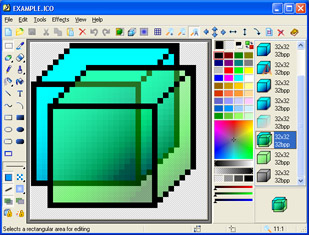
IconXP allows professional and amateur graphic artists alike to create and edit icons with smooth transparency. icon xp editor
With IconXP you can:
* Create and edit icons in either standard or custom sizes, in color depths up to 16 million colors
* Create and edit icons for Windows XP in 32-bit color depth with 8-bit alpha channel
* Open and edit images in sizes up to 3000x3000
* Import images in various graphic formats (ICO, ICPR, BMP, JPEG, ANI, CUR, GIF, PNG, WMF, XPM, XBM, WBMP and Adobe Photoshop PSD) directly into icons
* Export icon images to ICO, ICPR, BMP, JPEG, CUR, PNG, GIF, RC, XPM, XBM, WBMP and Adobe Photoshop PSD files
* Capture screen images
* Paint images with gradient and chess fill
* Modify images with drop shadow, smooth, rotate, grayscale, colorize, hue/saturation, roll and mirror effects
* Replace image colors
* Import and export icon color palettes
* Sort images inside icons
* Modify the default icons Windows uses to display My Computer, Recycle Bin, Internet, Start menu items, drives, shortcut and sharing overlays, system folders and other objects
* Customize your desktop attributes
* Customize your folder icons
System requirements: Windows 95/98/ME/2000/NT/XP/2003/Vista, 16 MB RAM, Pentium-133 MHz, 2 MB hard disk space, True Color video mode.
Trial limitations: 30-day trial period, nag-screen.
Download


