Showing posts with label image. Show all posts
Watermark image software
The watermark image program, is a free software that can add digital Watermarks to all your images, photos and pictures in the background with the transperancy you decide. The program can also resize the images before the digital watermark is added.
When creating the watermark, you can use either text or another picture as the source of the watermark. If you want to add the watermark to the background, you can set the logo or the text to be more or less transparent, and define the transparency color on the image or select the first pixel in the upper left corner as transparency color.
You can even use this program instead of photoshop to watermark your images, this is a quicker and more easy way of getting a watermark on all your images. Also watermark in Word, Excel or images used in pdf files can be made with this software.
This software works with Windows XP, Windows server 2003, Windows Vista, Windows server 2008, Windows 7 - with .NET framework 2.0 or higher installed.
[ Download ] | [ Visit Website ]

Resize My Photos 0.1.0
Resize My Photos is a freeware application for resizing multiple JPEG-images. The interface is easy and intuitive to use and allows you to batch resize your photos just the way you like it.
Resize My Photos even allows you to drag and drop files or folders from the Windows Explorer or through a right-click context menu.
Unlike many similar software, Resize My Photos is a light weight program that runs fast and flawlessly without taking a lot of resources. Just download and run the setup file and you will be ready to resize your images in a few minutes! And best of all it's totally FREE TO USE without any nags, ads or time limits!
[ Download ] | [ Visit Website ]

EXESHOW
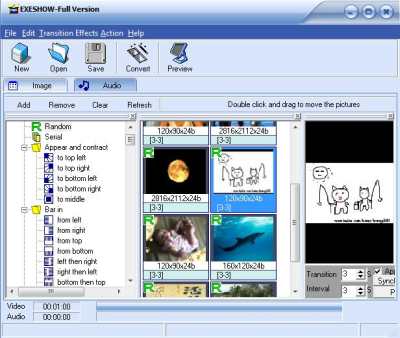
EXESHOW has simple and intuitive interface, so creating of a presentation is very easy. All you have to do is choose some pictures (in JPG, GIF or BMP format). EXESHOW will produce single EXE file, which contains all images inside. No additional programs (including EXESHOW itself) are needed to run resulting presentation - only that stand-alone EXE file. And it will work under Windows 95, 98, Me, NT, 2000 and XP, VISTA.
[ Download ] | [ Visit Website ]
Falco Auto Image
Falco Auto Image offers new features that enhance the power of methods.
Loading from BMP, GIF, PNG, JPG, PSD, TIF, TGA, PCD files.
Saving in JPG, GIF, PNG, BMP, TIF, TGA formats.
Working with scaner.
Working with web camera.
Effects: Contrast, Brightness, Invert Colors, Blur, GrayScale, HSB Adjustment, Sharpen, Emboss, Crop, Lighting, Resize.
Effects set loading from FCG files.
Effects set saving in FCG files.
Add text and time. Rotations. Flip.
Falco Auto Image has a new user interface that simplifies workflow. The graphical interface makes Falco Auto Image easier to learn.
Useful features make Falco Auto Image an even more powerful image editing tool.
[ Download ] | [ Visit Website ]

Free ISO Creator
Free ISO Creator can create ISO image from folders or data CD/DVD. With Free ISO Creator, you can easily create ISO image from any files and folders (with the subfolders), or backup data CD/DVD to your hard disk and directly create ISO files. Free ISO Creator is one of the best solution to create ISO file and it's completely FREE.
Features of Free ISO Creator: 1) Create ISO image from files, folders (with the subfolders), or data CD/DVD. 2) Create UDF/ISO image. 3) Create ISO file at a super high speed. 4) Easy to use, only 3 steps to create iso image. 5)Completely FREE!
[ Download ] | [ Visit Website ]


